


Microsoft Intune
Microsoft Intune is a cloud-based endpoint management solution. It manages user access to company resources and simplifies app and device management, including mobile devices, desktop computers and virtual clients. The range of functions is very extensive.
Microsoft Intune functions in detail
Microsoft Intune offers a comprehensive platform for managing and securing end devices and applications - all from the cloud. Here are the most important functions that are of particular interest to IT administrators:
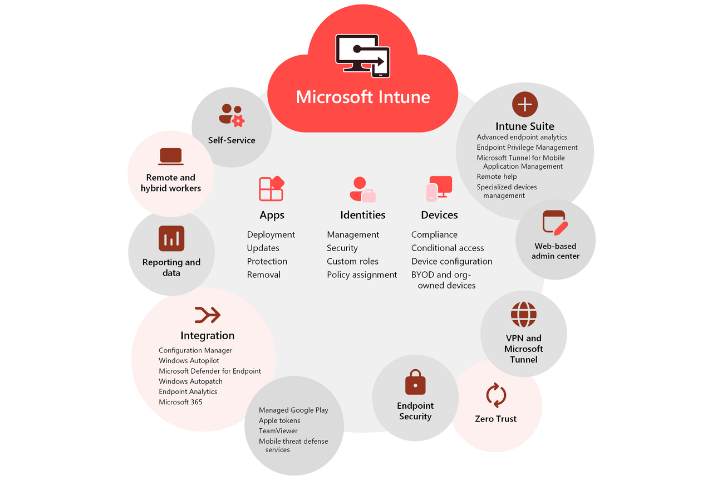
Integration & extension
Seamless connection with Microsoft Defender, Configuration Manager, Windows Autopilot and third-party apps such as TeamViewer, Google Play and Apple Business Manager.
Security functions
-
Protection of company data on managed and personal devices.
-
Support for MDM (Mobile Device Management) and MAM (Mobile Application Management).
-
Conditional access, app protection policies and data isolation.
Flexible access
-
VPN and WLAN policies, single sign-on (SSO), Windows Hello for Business.
-
Support for remote and local users with automated authentication.
Licensing of Microsoft Intune
Microsoft Intune is available as part of various license models:
-
Single license
-
Microsoft Intune Plan 1: Contains all core functions for MDM/MAM
-
Ideal for organizations that only need device management
-
-
Included in Microsoft 365
-
Microsoft 365 Business Premium
-
Microsoft 365 E3 / E5
-
Combines Intune with additional security and productivity features
-
-
Add-ons & extensions
- Intune Suite: Advanced functions such as Remote Help, Endpoint Privilege Management
- Integration with Defender for Endpoint, Entra ID, Purview
Persönliche Beratung
Ein Team von zahlreichen Spezialisten kümmert sich um Ihre Anfragen rund um das Thema IT-Infrastruktur oder zu Organisation, Kommunikation und Zusammenarbeit in der modernen Arbeitswelt. Hinterlassen Sie uns bitte Ihre Fragen und Nachrichten, damit ein ausgewiesener Experte in diesen Themen mit Ihnen in Kontakt treten kann.
Wir freuen uns auf Ihre Anfrage!